OverTheWire Bandit Walkthrough — Level 10 → 11 | 30-Day Cybersecurity Learning Journey (Day 10)
Decoding base64 encoded data from the command line and why recognizing and reversing encoding schemes is a skill every SOC analyst needs to have ready immediately.
Introduction
Day 10. Bandit Level 10 to Level 11. The file in this level is only 69 bytes. It is readable, it opens cleanly with cat and it contains a single line of text. But the text makes no immediate sense. It is a long string of uppercase and lowercase letters, numbers and symbols with no spaces and no obvious structure. It is not random. It is base64 encoded data and decoding it requires one command.
This level introduces encoding as a concept that is completely separate from encryption. Base64 is not a security mechanism. It is a way of representing binary data as printable text so it can be safely transmitted or stored in systems that only handle plain text. Attackers use it constantly to obfuscate payloads, commands and credentials because it looks unfamiliar to anyone who does not recognise the format on sight.
By the end of this article you will know how to identify base64 encoded content, decode it in one command and understand why this skill appears in phishing analysis, malware triage and incident response regularly.
Level Objective
The password for the next level is stored in the file data.txt, which contains base64 encoded data. The file contains a single encoded string. The objective is to decode it and read the password it contains. The commands suggested by OverTheWire for this level include grep, sort, uniq, strings, base64, tr and others.
Approach
I logged in using the password retrieved from the previous level:
ssh bandit10@bandit.labs.overthewire.org -p 2220
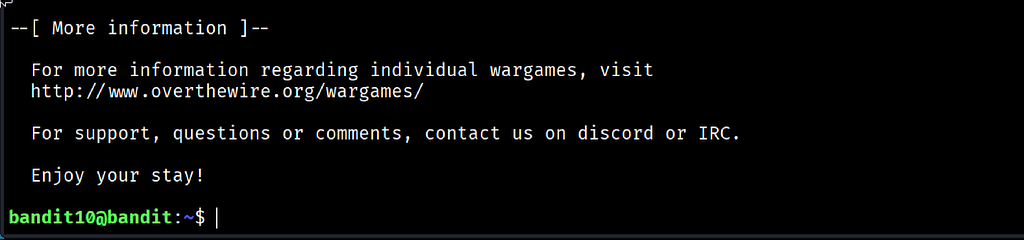
The banner loaded and ended with “Enjoy your stay!” and the prompt changed to bandit10@bandit:~$.
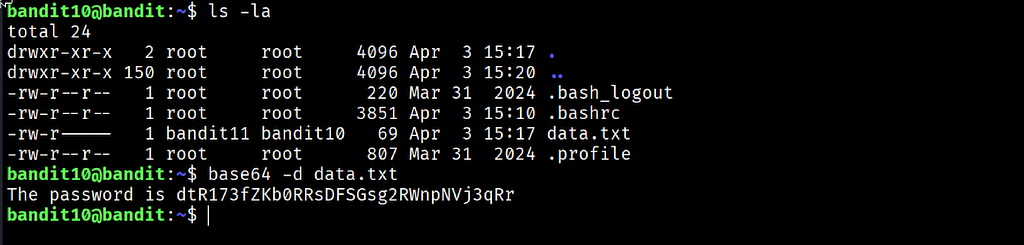
I ran ls -la and confirmed data.txt was present, owned by bandit11 with group bandit10, permissions -rw-r----- and a size of just 69 bytes. That small size was a signal. A 69-byte file is not storing binary data or thousands of lines. It is storing a single short encoded string.
I decoded it immediately using the built-in base64 tool with the decode flag:
base64 -d data.txt
The output printed as a complete plain English sentence: The password is dtR173fZKb0RRsDFSGsg2RWnpNVj3qRr. One command. Complete result.
Commands Used
# Connect to the Bandit server as bandit10 using the Level 10 password
ssh bandit10@bandit.labs.overthewire.org -p 2220
# Check the file and confirm its size before approaching it
ls -la
# Decode the base64 encoded content and print the result
base64 -d data.txt
Command Breakdown
base64 -d data.txt Reads the base64 encoded content of data.txt and decodes it back to its original form. The -d flag tells the tool to decode rather than encode. Without this flag base64 would encode the file content rather than reverse it, producing a longer encoded string instead of the original message.
base64 A command-line tool that handles base64 encoding and decoding. It is available by default on Linux and macOS systems. It can read from a file directly or from piped input, making it easy to combine with other commands in a pipeline.
-d The decode flag. It is the only flag needed here. It reverses the base64 encoding and outputs the original data as readable text.
Base64 format recognition Base64 strings use only uppercase letters, lowercase letters, numbers and the characters + and /. They frequently end with one or two = padding characters. A long string with no spaces that ends in = is almost always base64 encoded. Recognising that pattern on sight is a useful quick-identification skill.
Lesson Learned
The main technical takeaway is that base64 is encoding, not encryption. Encoding transforms data into a different format for compatibility or transport reasons. It is fully reversible by anyone with the right tool and no key or password is required to decode it. This distinction matters enormously in security work because base64 encoded content is sometimes mistaken for encrypted content, which completely changes how an analyst approaches it.
What made this level particularly clean was the output. Unlike previous levels where the answer appeared in a sea of other data, this one decoded directly into a complete readable sentence. The structure The password is [password] confirmed immediately that the decode was successful and the result was correct. That clarity comes from base64 encoding preserving the original content exactly.
The file size was also informative. Seeing 69 bytes in the ls -la output before even opening the file told me the content was short and likely a single encoded string. Reading metadata before opening a file is a habit that keeps paying off.
- base64 -d filename — decode a base64 encoded file
- echo "encodedstring" | base64 -d — decode a base64 string directly from the terminal
- base64 filename — encode a file into base64 format
- cat filename | base64 — pipe file content into base64 for encoding
- base64 -d filename | file - — decode and immediately check the file type of the result
🔴 SOC Analyst Insight
Base64 encoding is one of the most commonly used obfuscation techniques in malicious scripts, phishing emails and malware payloads. PowerShell commands delivered through phishing attacks are almost always base64 encoded to bypass email content filters and avoid keyword detection in security tools. When an analyst examines a suspicious email attachment, a flagged script or an unusual network request, encoded content is one of the first things to look for and one of the first things to decode.
# Decode a base64 encoded PowerShell command extracted from a suspicious email attachment
echo "cGluZyAxOTIuMTY4LjEuMQ==" | base64 -d
The command above decodes a base64 string that might appear inside a malicious macro or obfuscated dropper. The decoded output reveals what the attacker actually intended to execute. In a real investigation that information drives the next steps: scoping the impact, identifying the target system and determining whether the command was successfully run. Decoding it takes seconds. Not knowing how to decode it can cost minutes of confusion during an active incident.
Key Takeaway
Base64 is not encryption and it is not security. It is a reversible encoding scheme that attackers use to make malicious content less immediately readable to automated filters and human analysts who do not recognise the format. Recognising base64 by its character set and padding, and decoding it with a single command, is a skill that applies directly to phishing analysis, malware triage and log investigation. The faster an analyst can identify and reverse encoding schemes the faster they can read attacker intent and act on it.
30-Day Cybersecurity Learning Journey — Progress
🟢 Open Day — Setup & Series Introduction  | OverTheWire Bandit
✅ Day 0.   — Bandit Level 0               | First Login
✅ Day 1.   — Bandit Level 1 → 2           | Special Characters
✅ Day 2.   — Bandit Level 2 → 3           | Spaces in Filenames
✅ Day 3.   — Bandit Level 3 → 4           | Hidden Files
✅ Day 4.   — Bandit Level 4 → 5           | File Types
✅ Day 5.   — Bandit Level 5 → 6           | find with Properties
✅ Day 6.   — Bandit Level 6 → 7           | find across Filesystem
✅ Day 7.   — Bandit Level 7 → 8           | grep
✅ Day 8.   — Bandit Level 8 → 9           | sort and uniq
✅ Day 9.   — Bandit Level 9 → 10          | strings and grep
✅ Day 10.  — Bandit Level 10 → 11         | base64  ← today
⬜ Day 11.  — Bandit Level 11 → 12         | coming next
Follow along with the series as I document each level, command and lesson learned.
Encoding hides intent from the casual observer. One command is all it takes to read exactly what was written.
OverTheWire Bandit Walkthrough — Level 10 → 11 | 30-Day Cybersecurity Learning Journey (Day 10) was originally published in System Weakness on Medium, where people are continuing the conversation by highlighting and responding to this story.