OverTheWire Bandit Walkthrough — Level 7 → 8 | 30-Day Cybersecurity Learning Journey (Day 7)
Using grep to find one line inside a 4MB file and why the ability to search through large text files instantly is the most used skill in log analysis.
Introduction
Day 7. Bandit Level 7 to Level 8. The file is right there in the home directory. The location is not the problem this time. The problem is what is inside it. The data.txt file in this level is over 4 megabytes in size. It contains thousands of word and password pairs. Reading through it manually is not realistic. Scrolling through it with cat would flood the terminal for minutes. The answer is buried somewhere in all of that text and the only sensible way to find it is with grep.
This level introduces grep, the tool SOC analysts reach for more than almost any other during day-to-day investigation work. It searches through text and returns only the lines that match a pattern you specify. One command. One result. Regardless of how many thousands of lines surround it.
By the end of this article you will understand the correct workflow for approaching a large unknown file: check its size, preview its structure and then search precisely for what you need.
Level Objective
The password for the next level is stored in the file data.txt next to the word millionth. The file contains a large number of word and password pairs. The target is the single line where the word on the left is millionth. The commands suggested by OverTheWire for this level include grep, sort, uniq, strings, base64, tr and others.
Approach
I logged in using the password retrieved from the previous level:
ssh bandit7@bandit.labs.overthewire.org -p 2220
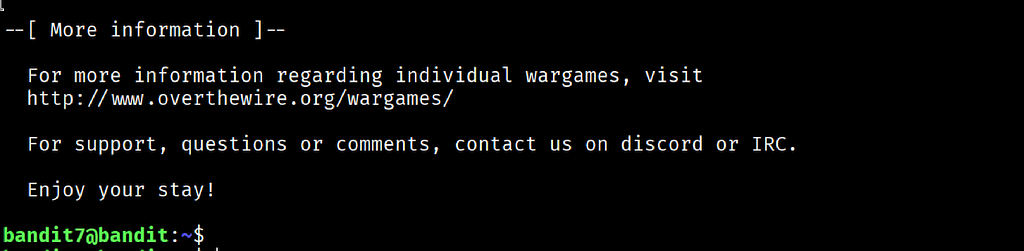
The banner loaded and ended with “Enjoy your stay!” and the prompt changed to bandit7@bandit:~$.
I ran ls -la to understand what I was working with before touching the file:
ls -la
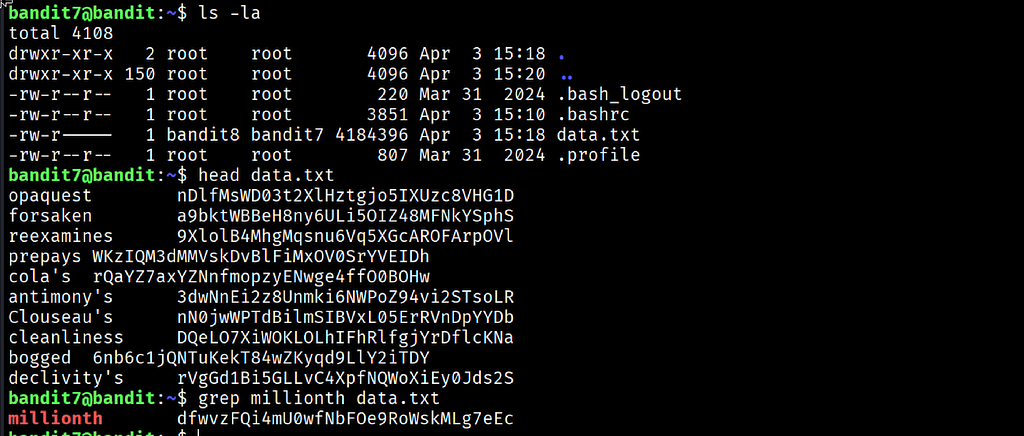
The output showed data.txt owned by bandit8 with group bandit7 and permissions -rw-r-----. The file size was 4,184,396 bytes. That is over 4 megabytes of text. Running cat on it was not a realistic option.
I ran head to preview the first few lines and understand the file structure before deciding how to search it:
head data.txt
The output confirmed the format immediately: each line contained a single word on the left followed by a password string on the right. Knowing the structure made the search straightforward. I ran grep targeting the word millionth:
grep millionth data.txt
One line came back instantly with the word millionth highlighted in red and the password beside it.
Commands Used
# Connect to the Bandit server as bandit7 using the Level 7 password
ssh bandit7@bandit.labs.overthewire.org -p 2220
# List the home directory with full detail to check the file size before approaching it
ls -la
# Preview the first 10 lines to understand the file structure
head data.txt
# Search the file for the line containing the word millionth
grep millionth data.txt
Command Breakdown
ls -la Used here specifically to check the file size before deciding on an approach. Seeing 4,184,396 bytes immediately ruled out cat and any manual reading strategy. Always check size before opening an unknown file.
head data.txt Prints the first 10 lines of a file by default. Running this before searching confirmed the file structure: one word followed by one password string per line. Understanding the structure before searching means you know exactly what pattern to look for with grep.
grep millionth data.txt Searches every line in data.txt for the pattern millionth and prints only the lines that match. The search completed in under a second despite the file being over 4 megabytes. The terminal highlighted the matching word in red, making the result immediately readable.
grep Short for Global Regular Expression Print. It reads input line by line, tests each line against a pattern and outputs only the matching lines. It does not slow down on large files. It processes the same pattern search against ten lines or ten million lines with the same single command.
Lesson Learned
The main technical takeaway is the three-step workflow this level demonstrated: check the size, preview the structure and then search precisely. Running ls -la first revealed a file too large to read manually. Running head showed the structure without opening the whole file. Running grep extracted the one line that mattered from thousands.
That sequence is not specific to this level. It is the correct way to approach any large unknown file during an investigation. Each step takes seconds and each one informs the next. Jumping straight to cat on a 4MB file would have been the wrong move.
The terminal colour highlighting from grep is also worth noting. When grep matches a pattern it highlights the matched text in the output by default. In this level the word millionth appeared in red against the rest of the line. During a fast-paced investigation that visual signal makes it immediately clear which part of the output is the match and which is surrounding context.
- grep "pattern" filename — search a file for lines matching a specific pattern
- grep -i "pattern" filename — case-insensitive search
- grep -n "pattern" filename — include line numbers in the output
- grep -c "pattern" filename — count how many lines match without printing them
- head filename — preview the first 10 lines of any file before deciding how to approach it
- wc -l filename — count the total number of lines in a file
🔴 SOC Analyst Insight
In a real SOC environment, grep is the first tool an analyst reaches for when searching through logs for indicators of compromise. An alert fires. The analyst needs to know whether a specific IP address appeared in the web access logs, whether a username shows up in authentication records, or whether a known malicious domain was queried in DNS logs. Every one of those searches is a grep command against a large file that cannot be read manually.
# Search authentication logs for failed login attempts from a specific IP address
grep "Failed password" /var/log/auth.log | grep "192.168.1.105"
The command above chains two grep calls through a pipe. The first filters the entire auth log for failed password events. The second narrows those results down to a specific source IP. That progressive filtering is a pattern analysts use constantly because it reduces a large noisy dataset down to precisely the events that matter. The data.txt file in this level works exactly the same way. One file, one keyword, one result.
Key Takeaway
grep is the single most used text search tool in Linux security work. The ability to search millions of lines and return only what matches a specific pattern in under a second is what makes log analysis tractable at scale. The workflow of checking file size, previewing structure and then searching precisely is not a beginner approach to be replaced later. It is the correct professional approach every time an unknown large file appears during an investigation.
30-Day Cybersecurity Learning Journey — Progress
🟢 Open Day — Setup & Series Introduction  | OverTheWire Bandit
✅ Day 0.   — Bandit Level 0               | First Login
✅ Day 1.   — Bandit Level 1 → 2           | Special Characters
✅ Day 2.   — Bandit Level 2 → 3           | Spaces in Filenames
✅ Day 3.   — Bandit Level 3 → 4           | Hidden Files
✅ Day 4.   — Bandit Level 4 → 5           | File Types
✅ Day 5.   — Bandit Level 5 → 6           | find with Properties
✅ Day 6.   — Bandit Level 6 → 7           | find across Filesystem
✅ Day 7.   — Bandit Level 7 → 8           | grep  ← today
⬜ Day 8.   — Bandit Level 8 → 9           | coming next
Follow along with the series as I document each level, command and lesson learned.
In a file with thousands of lines the answer is always there. grep finds it before you finish the thought.
OverTheWire Bandit Walkthrough — Level 7 → 8 | 30-Day Cybersecurity Learning Journey (Day 7) was originally published in System Weakness on Medium, where people are continuing the conversation by highlighting and responding to this story.